SSL Certificate Automation
Set up SSL certificate automation once and never do a manual
SSL install again
Manual certificate renewals are one of the most common causes of unplanned downtime and expired-certificate browser warnings. Both cost far more in lost trust and traffic than the few minutes it takes to automate the process.
Learn more: Why Automate | How It Works | Agent vs. ACME | FAQs
Automated SSL Plans
Name of Product
Validation Needs
Agent-Based Automation
ACME-Based Automation
Cheapest Price
Name of Product
RapidSSL w/Automation
Validation NeedsDomain
Agent-Based Automation 
ACME-Based Automation –
Cheapest Price $26.84/yr.
Name of Product
RapidSSL Wildcard w/Automation
Validation NeedsDomain
Agent-Based Automation
ACME-Based Automation –
Cheapest Price $133.17/yr.
Name of Product
PositiveSSL w/Automation
Validation NeedsDomain
Agent-Based Automation
ACME-Based Automation
Cheapest Price $21.38/yr.
Name of Product
PositiveSSL Wildcard w/Automation
Validation NeedsDomain
Agent-Based Automation
ACME-Based Automation
Cheapest Price $104.12/yr.
Name of Product
Comodo SSL w/Automation
Validation NeedsDomain
Agent-Based Automation
ACME-Based Automation
Cheapest Price $90.38/yr.
Name of Product
Comodo SSL Wildcard w/Automation
Validation NeedsDomain
Agent-Based Automation
ACME-Based Automation
Cheapest Price $255.99/yr.
Name of Product
Sectigo SSL w/Automation
Validation NeedsDomain
Agent-Based Automation
ACME-Based Automation
Cheapest Price $90.38/yr.
Name of Product
Sectigo Wildcard SSL w/Automation
Validation NeedsDomain
Agent-Based Automation
ACME-Based Automation
Cheapest Price $255.99/yr.
Why Automate?
With automation, SSL certificate issuance and renewal happen on their own. No calendar reminders, no renewal tickets, no last-minute scramble before an expiration date. It runs directly on the servers you already manage, with nothing extra to maintain.
Certificates don’t last as long as they used to
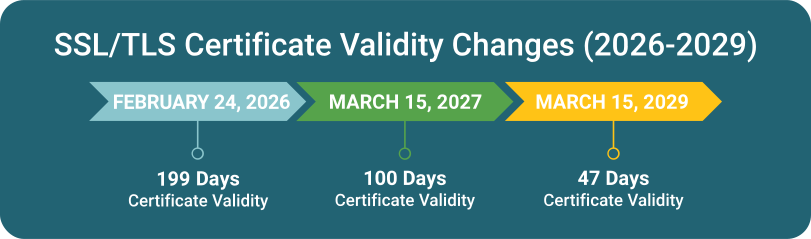
Public SSL/TLS certificates are capped at 200 days today, dropping to 100 days in March 2027 and just 47 days by March 2029, under the CA/Browser Forum's phased validity reduction.
At a 47-day lifespan, that's a renewal roughly every six weeks. Manually, that's over 8 renewals a year, per server. Automation is what is going to keep that sustainable.
How SSL Automation Works
- Install the agent. One terminal command installs the automation agent on your server.
- Connect and authorize. Run the install command with your token to link the server to your account.
- Automatic issuance. The system generates the CSR, completes domain validation, and installs the certificate.
- Ongoing renewal. From here, renewals happen automatically ahead of expiration. No further action needed.
Supported Platforms
All plans issue single-domain and wildcard, domain-validated (DV) certificates from trusted public Certificate Authorities.
Agent-based automation:
Our automation agent works on:
- Windows Server 2016 through 2025 (IIS web server)
- Ubuntu, Debian, CentOS and other Linux distros (Apache or NGINX web server)
* Requires root or administrator access on the target server to install
ACME-based automation:
ACME-based automation works with a wide variety of systems:
- ACME clients: Certbot, win-acme (WACS), acme.sh, and more
- Web servers and reverse proxies: Caddy, Traefik
- Containers: cert-manager for Kubernetes
- Load balancers and ADCs: F5 BIG-IP, Citrix ADC / NetScaler
- Hosting control panels: cPanel/WHM, Plesk
FAQ — SSL Automation
No. Once the agent is installed and connected, certificate issuance and renewal happen automatically going forward. You won't need to log in or run any commands unless you're adding a new domain or server.
Hide
The system checks certificate status daily and initiates renewal well ahead of the expiration date, so there's a built-in buffer if a first attempt doesn't go through. When using agent-based automation, alerts are sent if an issue needs attention.
Hide
Our automation agent is built to run on Windows Server (2016–2025, IIS) and Linux (Ubuntu, Debian, CentOS with Apache or NGINX). Or you can choose ACME automation, which is compatible with any system that supports ACME natively or via an ACME client (such as certbot, ACME.sh, simple-acme, etc). Not sure if your system will work? Contact us to identify the best automation option for your environment.
Hide
Single-domain and wildcard, domain-validated (DV) certificates from trusted public Certificate Authorities.
Hide
The Agent is a small piece of software installed directly on your server that handles the entire process: issuance, validation, installation, and renewal, with nothing else to configure. ACME lets you use a client you may already run (Certbot, win-acme, acme.sh, and others) to talk to our automated issuance system instead. Both result in the same fully automated renewal.
Hide
Industry-wide rules from the CA/Browser Forum are shortening the maximum lifespan of public SSL/TLS certificates: 200 days as of March 2026, dropping to 100 days in March 2027, and 47 days by March 2029. That's exactly the problem automation is built to solve. Once it's set up, you won't notice the renewals happening at all.
Hide
 0